Computer Hardware
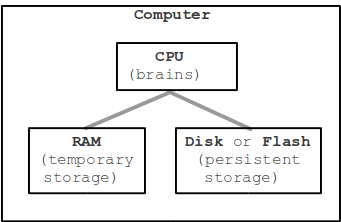
There are three major parts that make up a computer -- CPU, RAM, and Persistent Storage. These three are found in a laptop, or a smart phone, or a tablet.
CPU
CPU - Central Processing Unit - inevitably referred to as the "brains" of the computers. The CPU does the active "running" of code, manipulating data, while the other components have a more passive role, such as storing data. When we say that a computer can "add two numbers, a billion times a second" .. that's the CPU. When you hit the Run button, the CPU ultimately "runs" your code. Later on, we will complete the picture of how your Javascript code is run by the CPU.
Bytes
The space that data takes up in the computer is measured in by the "byte". One byte is big enough to hold a single typed letter, like 'a'. Here we'll look at storing data in RAM memory and in persistent storage like a hard drive. All of that storage space will be measured in bytes.
File System
The hard drive or flash drive provides persistent storage as a flat, undifferentiated collection of bytes without any organizational structure. Typically the hard disk or flash disk is formatted with a "file system" which organizes the bytes into the familiar pattern of files and directories, where each file and directory has a somewhat useful name like "resume.txt". When you connect the drive to a computer, the computer presents the drive's file system to the user, allowing them open files, move file around, etc. Essentially, each file in the file system refers to a block of bytes, so the "flowers.jpg" name refers to a block of 48KB of bytes which are the data of that image. The file system in effect gives the user a name (and probably an icon) for a block of data bytes, and allows the user to perform operations on that data, like move it or copy it or open it with a program. The file system also tracks "meta information" about the bytes: how many there are, the time they were last modified. Microsoft uses the proprietary NTFS file system, and Mac OS X has its Apple proprietary HFS+ equivalent. Many devices (cameras, MP3 players) use the very old Microsoft FAT32 file system on their flash cards. FAT32 is an old and primitive file system, but it is good where wide support is important (Microsoft claims to hold patents needed to read or write FAT32, but it is widely implemented anyway). Proprietary and patented formats make it hard to store and use your own data.

Good information. Thank you
ReplyDelete